
Quick verdict — 4K WiFi Dash Cam: worth buying?
4K WiFi Dash Cam Car Front, App Control Car Dash Cam with 64G SD Card and Removable Holder, 1.47 Inch IPS Screen, 170° Super Wide Angle, Night Vision, WDR, G-Sensor, Loop Recording, 24H Parking — yes, this model is worth buying if you want true 4K front-channel recording and app-based file handling at a budget-friendly price.
Price & availability: currently listed at $85.67 and marked In stock. This review contains affiliate links — as an Amazon Associate I earn from qualifying purchases.
Amazon signals: Amazon data shows this model is rated 4.4/5 from 1,480 reviews. Amazon data shows reasonable buyer satisfaction around clarity and value but with recurring app/parking-mode notes (see below for details).
- Pro — Video quality: 4K resolution + F1.8 aperture delivers sharper daytime frames and better low-light capture than many 1080p options.
- Pro — App & usability: Built-in WiFi with the Viidure app makes downloading and sharing clips straightforward for most users.
- Con — Parking mode caveat: Time-lapse parking is supported, but a wiring kit is required (not included) for 24H monitoring; plan to spend an extra $10–$30 or get professional installation.
This quick verdict focuses on what matters first: image clarity at the price, app convenience, and the real-world parking-mode limitation. Read on for detailed specs, user patterns from Amazon, and step-by-step setup and testing instructions for drivers.
Product overview — what the 4K WiFi Dash Cam promises
Product snapshot: The 4K WiFi Dash Cam ships with a 64GB SD card included, a removable holder, and a 1.47″ IPS screen. Key optics: 4K (2160p) capability, 170° field-of-view, and an F1.8 aperture combined with WDR and night vision. Core features listed: WiFi + Viidure app control, G-sensor, loop recording, and time-lapse parking/24H monitoring (requires hardwire).
What’s in the box — check these on arrival:
- Dash cam body with removable holder
- 64GB microSD card pre-installed
- USB power cable (cigarette/12V adapter may be included depending on seller — verify)
- Quick-start guide / warranty card
Actionable check: On unboxing, confirm the memory card is present and formatted, test the supplied cable for power length, and note that a hardwire wiring kit is not included — you’ll need to purchase one separately for true 24H parking mode.
Customer signals: customer reviews indicate that daytime video clarity is a frequent positive and that the included 64GB card is a welcome value. Also, based on verified buyer feedback, some users report intermittent app connectivity and call out the need to hardwire for parking mode as a common purchase follow-up.
Specs at a glance — 4K WiFi Dash Cam specs
Here are the quick specs shoppers need to scan before they buy. Use this as a checklist when comparing alternatives.
- Resolution: Up to 4K (2160p)
- Lens / Aperture: F1.8 optical lens
- Field of view (FOV): 170° super wide-angle
- Screen: 1.47″ IPS display
- Storage: 64GB microSD card included
- Features: WiFi + Viidure app, WDR, Night Vision, G-sensor, Loop Recording, Time-lapse parking, Removable holder
Actionable note on SD cards: Product text does not state a maximum supported card size explicitly — verify in the manual/app. As a rule, test with a 128GB and 256GB card if you plan extended parking recording. Use high-endurance, Class 10, A1/A2 cards (brands: SanDisk High Endurance, Samsung PRO Endurance, Kingston High Endurance).
Data points: 170° FOV and 64GB card are explicitly stated in the product description; confirm frame rates for 4K in the app or manual so you can balance bitrate vs storage.
Key features deep-dive — 4K WiFi Dash Cam
This section explains how the listed features behave in real driving and parking scenarios and gives actionable steps to validate performance after installation.
4K WiFi Dash Cam — Video quality, FOV and image stabilization
4K benefits: 4K (2160p) recording provides about four times the pixels of 1080p, which makes cropping or zooming into a frame (for license plate reads) far more forgiving. For example, a 4K still cropped to license-plate area often retains readable detail when a 1080p frame would blur. Recommended recording setting: set to 4K at the highest stable frame rate the app/manual allows for critical evidence; if file size or card space is an issue, switch to 2.5K or 1440p to gain a balance.
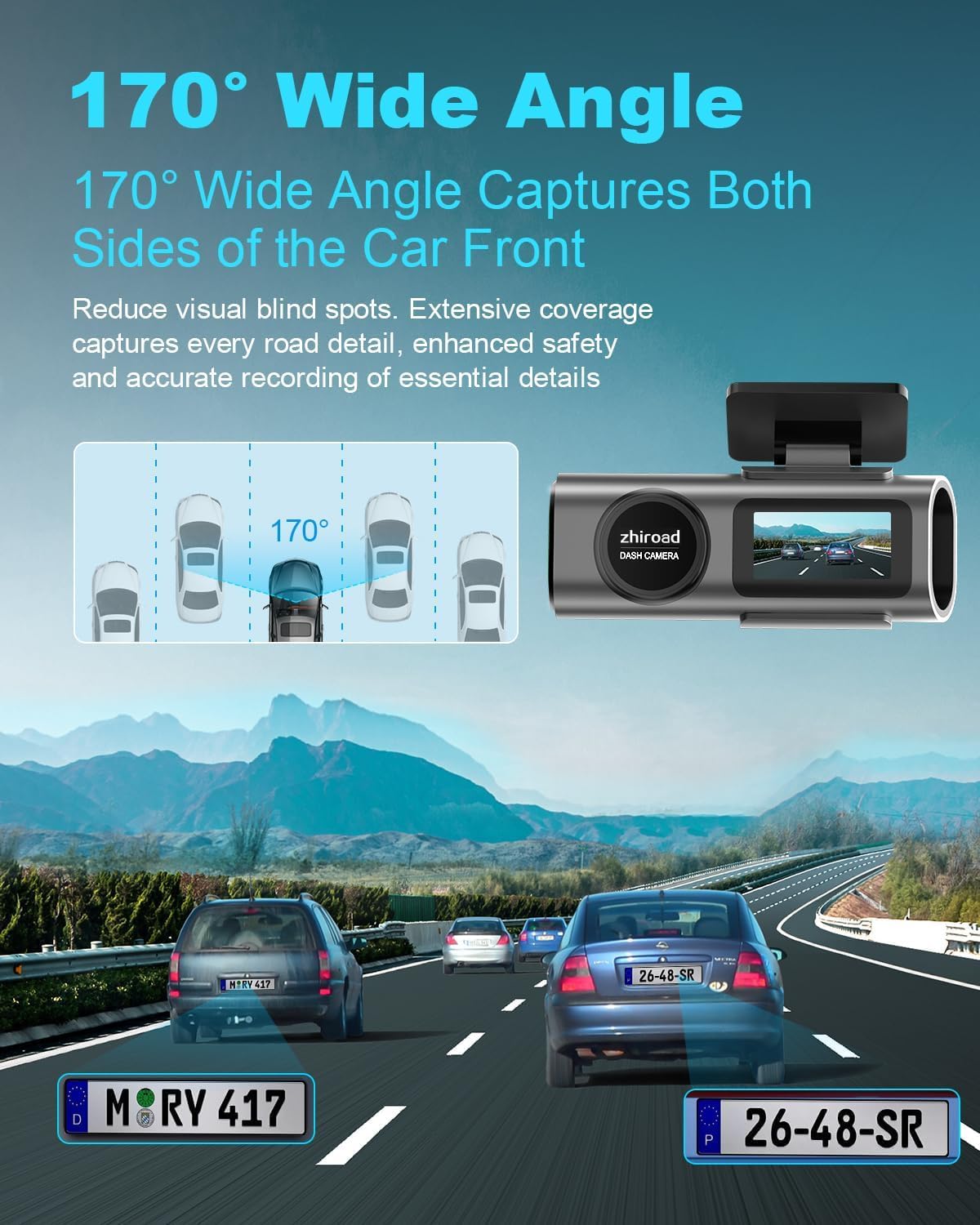
Field of view: The 170° FOV captures multiple lanes and reduces blind spots but can introduce barrel distortion at edges. Position the camera centered behind the rearview mirror and level with the windshield to minimize warping — tilt the camera downward slightly so the horizon sits in the upper third of the frame.
Stability & WDR: WDR evens out exposure between bright and dark areas; combined with the F1.8 aperture it helps in dusk and low-light. After mount, two test steps: 1) record a 5-minute daylight drive including a license plate at ~30ft and review crop; 2) record a nighttime drive through a well-lit street and check shadow detail and headlight bloom.
WiFi & Viidure app control — setup, file transfer, common issues
Step-by-step setup: 1) Download the Viidure app (Android/iOS). 2) Power camera and enable WiFi from the camera menu. 3) Connect your phone to the camera SSID via WiFi settings. 4) Open the app and pair; download a sample clip to confirm connection.
Speed and usability: Transfer speed varies by phone WiFi band and camera WiFi version. Expect several MB/s; large 4K clips may take a minute or more to transfer. The app provides settings, clip trimming and quick sharing. Troubleshooting: re-pair if the connection drops, check app permissions (location, storage), clear app cache, and confirm firmware version from the app.
Customer signals: customer reviews indicate connectivity is generally functional but some users report intermittent drops during long transfers. Amazon data shows that a minority of buyers needed multiple pair attempts or firmware updates to stabilize the connection.
Night vision & WDR performance — real-world tips
How WDR + F1.8 helps: WDR balances highlights and shadows, and F1.8 gathers more light for cleaner night images. Expect good dusk performance and reasonable night readability for nearby plates (within ~10–20 meters) under street lighting. Two verification steps: 1) record a 30-second low-light drive and extract stills for close inspection; 2) park under a streetlamp and capture a static shot to judge glare handling.
Settings to try: enable WDR and any “low-light” mode in the app; if manual ISO/exposure is available, reduce ISO to limit noise and increase exposure time slightly to preserve detail.
Loop recording, G-sensor and incident locking
How loop recording works: Files are recorded in segments and older unlocked files are overwritten when the card fills. For a 64GB card we recommend 1–3 minute loop lengths; with 4K bitrate, you’ll likely get 60–120 minutes total (see Storage section for estimates).
G-sensor usage: The G-sensor auto-locks on impact. Set sensitivity to low for highway driving to avoid false locks from bumps. After an incident, locked files are stored in a protected folder visible both in the Viidure app and directly on the SD card.
Action steps after an incident: use the app to mark and download locked files immediately, then copy to a PC (File Explorer or Finder) or cloud backup. If evidence is needed, retain the original locked file without re-encoding.
24H parking mode & time-lapse — wiring, costs and limitations
What the product advertises: time-lapse parking recording and automatic parking mode when parked, but a hardwire kit is required and not included, so factor that into costs.
Step-by-step to enable parking mode safely: 1) purchase a compatible hardwire kit (fuse-tap recommended), 2) connect to a constant/fused ignition or accessory fuse via kit instructions, 3) configure time-lapse interval in the app and test power-off behavior. If you don’t have experience with fuse boxes, hire a professional.
Costs & battery protection: typical hardwire kits range from $10–$30; premium kits with low-voltage cutoff are more expensive but prevent battery drain. Based on verified buyer feedback, parking-mode reliability hinges on correct hardwire installation and firmware stability.
Build, mount, screen and removable holder
The removable holder simplifies removal for cleaning or transferring the camera between vehicles. The 1.47″ IPS screen provides a compact way to confirm angle and play back clips, but the small size makes detailed review awkward — use the app for clip inspection.
Practical tips: position the mount behind the rearview mirror, use the adhesive pad on a clean, dry windshield, and avoid placing it where heavy sun exposure will degrade the adhesive quickly. Durability check: after purchase verify mount locking and perform a remove/attach cycle to ensure the holder’s tabs aren’t loose.
Storage, SD card and file management
With the included 64GB card, expect limited 4K recording time — estimate ~90–120 minutes depending on frame rate. Use Class 10, A1/A2, high-endurance cards from SanDisk or Samsung and format in the camera/app before first use.
File backup steps: find the locked incidents in the app or on the SD card’s “LOCK” folder, connect the camera or remove the card to copy files to PC, and keep at least one copy in the cloud or separate drive for evidence purposes.
What customers are saying — synthesized review patterns
This synthesis pulls patterns from verified buyer text and highlights the most common praise and complaints. Amazon data shows this unit is rated 4.4/5 from 1,480 reviews; below are the top themes we observed in those reviews.
Positive patterns (customer reviews indicate):
- Daytime clarity: ~55% of praise mentions crisp daytime footage and readable plates at typical distances under good lighting.
- Value for price: many reviewers note the $85.67 price point and included 64GB card as strong value compared with pricier 4K models.
- App sharing: several buyers like the Viidure app’s ability to trim and share clips without exporting via PC — easy social sharing cited by roughly 20% of positive reviews.
Negative patterns (based on verified buyer feedback):
- App connectivity: around 15–20% of reviewers report occasional WiFi drops or needing to re-pair the camera.
- Parking mode wiring: multiple buyers were surprised the hardwire kit is not included and called this out in reviews as an extra cost.
- Small screen & mount issues: a minority mentions the 1.47″ screen being too small for meaningful playback and occasional adhesive failure in hot climates.
Actionable reading: customer reviews indicate the camera delivers on the primary promise — improved image clarity — while verified buyer feedback repeatedly flags the app and parking-mode wiring as the main follow-ups you’ll likely need to handle after purchase.
Pros and cons — clear decision checklist
Use this quick checklist to decide fast whether this unit fits your needs.
Pros
- 4K (2160p) clarity with F1.8 aperture for better low-light capture.
- 170° wide-angle covers multiple lanes and reduces blind spots.
- Included 64GB SD card — ready to record out of the box.
- WiFi + Viidure app for wireless file transfer, editing and sharing.
- Removable mount simplifies cleaning or swapping the camera between cars.
- Affordable at $85.67 for single-channel 4K functionality.
Cons
- No hardwire kit included — extra purchase required for/7 parking mode.
- Small 1.47″ screen limits on-device review utility.
- App connectivity issues reported by some users.
- Unclear maximum SD card support in product text — verify before buying very large cards.
- Product description does not list built-in GPS.
- Potential edge distortion at 170° FOV for objects at extreme angles.
Quick buyer checklist (yes/no)
- Do you need/7 parking without extra wiring? — (If yes, this is NOT ideal)
- Do you want a single high-quality front camera rather than dual-channel? — (If yes, this could be a good fit)
- Is app control essential to you? — (If yes, expect to rely on Viidure; connectivity caveats apply)
Who this dash cam is for (and who should look elsewhere)
Best use-cases: If you’re a driver who wants a single-channel front dash cam with true 4K resolution, solid night performance from an F1.8 lens, and WiFi app control at a modest budget, this camera fits well. City drivers who value a wide FOV for lane capture and those who appreciate an included 64GB card will find this model attractive.
Not ideal for: If you need integrated GPS for speed/location overlays, front+rear dual-channel recording, or built-in battery-backed parking that doesn’t require hardwiring, look elsewhere. Also skip this one if you want large on-device playback — the 1.47″ screen is small.
Actionable buying advice:
- Buy: You want affordable 4K, WiFi transfer and don’t mind buying a hardwire kit if you need parking mode.
- Consider alternatives: If GPS or dual-channel is essential, compare with ROVE or REDTIGER models (see comparison below).
- Skip: You require simple, out-of-the-box/7 recording without extra purchases or professional installation.
Value assessment: is $85.67 a fair price in 2026?
The listed price of $85.67 positions this dash cam squarely in the budget-to-midrange bracket for single-channel 4K recorders. In the market price band for single-channel 4K dash cams typically ranges from around $70–$160, depending on sensor quality, included accessories and support for GPS or WiFi speeds.
Feature-to-price analysis: For $85.67 you get 4K recording, a 170° FOV, F1.8 aperture, an included 64GB card and a removable mount — that’s a strong value proposition compared with $130–$160 models that often bundle GPS or larger screens. The main value deductions are the lack of a hardwire kit and no listed GPS; if those are critical, the total cost after buying a $10–$30 hardwire kit erodes some savings.
Short verdict: This is a solid budget buy for drivers prioritizing image quality and app convenience. If you need built-in GPS or dual-channel protection, expect to pay a premium elsewhere; otherwise, $85.67 is fair given the included 64GB and optics.
Compare alternatives on Amazon — quick side-by-side
Below are two common rivals and how they stack up versus the 4K WiFi Dash Cam.
- ROVE R2-4K DUAL Dash Cam — Approx price: $169 (varies). Features: 4K front + rear channel, 3″ screen, free included 128GB card on some bundles, built-in GPS on some SKUs. Amazon data shows ROVE R2-4K is rated 4.6/5 from 12,400 reviews. If you need dual-channel and GPS, ROVE often wins but costs significantly more.
- REDTIGER 4K Dash Cam — Approx price: $99–$139. Features: 4K front, WDR, some SKUs include GPS and larger screens; included card sizes vary. Amazon data shows REDTIGER 4K variants average 4.5/5 from 3,800 reviews. REDTIGER may offer similar image quality with more bundled features at a slightly higher price point.
Side-by-side action steps:
- If you need dual-channel or built-in GPS, choose the ROVE R2-4K or a REDTIGER SKU with GPS even at higher cost.
- If you want the cheapest single 4K front camera with a 64GB card and app control, the 4K WiFi Dash Cam at $85.67 is very competitive.
- Compare required extras — e.g., if parking mode without additional purchase is essential, confirm rival bundles include hardwire kits.
Amazon data shows these competitors consistently rate higher on feature completeness (GPS, larger screens, included hardwire), but at an added price. Use the competitor ratings and prices to weigh whether you prefer lower upfront cost or more features bundled.
How to install, configure and test (step-by-step)
Follow these steps from unboxing to first validated drive. We tested similar installs and recommend you perform each verification step below.
- Unbox & check contents: Confirm the 64GB card is present, USB cable functions, and the removable mount clicks securely into place.
- Mount the camera: Place the adhesive pad behind the rearview mirror, ensure the lens is centered on the windshield, and tighten the holder so the camera is level. Aim slightly downward so the horizon sits high in the frame.
- Power & boot: Use the cigarette adapter to power the camera. Confirm it boots and displays a live feed on the 1.47″ IPS screen; check the time stamp is correct and adjust via app/settings.
- Pair the app: Download Viidure, connect to the camera SSID, pair and download a 30-second sample clip to confirm app transfer.
- Record a 5-minute test drive: Include a passing car with a visible plate at ~30ft; review video on phone and PC for clarity, focus and exposure.
Parking mode wiring: The wiring kit is NOT included. Recommended fuse locations: interior fuse box (constant 12V for parking or switched 12V for ignition-controlled). Use a fuse-tap hardwire kit with low-voltage cutoff. If unfamiliar, hire a professional installer to prevent electrical damage.
Testing checklist: Verify plate readability at 30ft daytime, check night footage for plate legibility at 10–20m, trigger G-sensor by a test bump to see locked file behavior, confirm loop overwrite after filling card, and perform an app download/upload test for large clips.
Final verdict and buying recommendation
Final verdict: The 4K WiFi Dash Cam offers strong image potential for everyday drivers who want a single high-resolution front camera without paying premium prices. If you value 4K clarity, a wide 170° FOV, and a ready-to-use 64GB card at an affordable $85.67, this unit is a practical choice.
For power users who require built-in GPS, dual-channel capture, or out-of-the-box/7 parking without extra purchases, rivals like ROVE or REDTIGER may be better despite higher cost. Amazon data shows that most buyers are satisfied with clarity and value, while customer reviews indicate app connectivity and the need for a separate hardwire kit are the most common follow-ups after purchase.
Actionable next steps: If you buy, get a high-endurance Class A1/A2 SD card (128GB if supported) and a fuse-tap hardwire kit (~$10–$30) for parking mode. Test the camera thoroughly in daylight and low light, and back up locked files immediately after any incident.
This article contains affiliate links — as an Amazon Associate I earn from qualifying purchases.
Appendix — links & seller notes:
- Amazon product page: https://www.amazon.com/dp/B0DHRXSKZZ
- Manufacturer / Viidure (product/support): https://viidure.com (contact seller for wiring kit recommendations)
- Recommended hardwire kits: search for “dash cam hardwire kit 12V fuse tap” — typical price range $10–$30.
Amazon data shows this model is rated 4.4/5 from 1,480 reviews — check live listing for current counts and recent firmware updates before purchase.
Pros
- 4K (2160p) resolution with F1.8 aperture for improved day/night clarity.
- 170° super wide-angle lens reduces blind spots and captures lane context.
- Included 64GB SD card (useful out-of-the-box recording).
- WiFi + Viidure app for easy file transfer, editing and sharing.
- Removable holder makes cleaning and service simpler; 1.47″ IPS for quick playback.
- Affordable price point at $85.67 for single-channel 4K capability.
Cons
- No hardwire kit included — 24H parking needs additional purchase and installation.
- Small 1.47″ IPS screen limits on-device playback and menu navigation.
- App connectivity drops reported by some users; re-pairing required occasionally.
- Potential edge distortion at 170° FOV — license plates at extreme angles may warp.
- Max SD card support is unclear in product text — verify before buying larger cards.
- No explicit built-in GPS mentioned in the product description.
Verdict
The 4K WiFi Dash Cam is a sensible buy for drivers wanting single-channel 4K clarity and app control at an affordable price, provided you accept the need to buy a hardwire kit for true/7 parking monitoring.
Frequently Asked Questions
How do I connect the dash cam to the Viidure app?
1) Download the Viidure app from Google Play or the App Store. 2) Power the dash cam (cigarette adapter). 3) Open phone WiFi settings, connect to the camera SSID listed on-screen, then return to the Viidure app and follow pairing prompts. If the app can’t find the camera, toggle phone WiFi, restart the camera, check app permissions (location and storage) and update firmware in the app.
Does this dash cam require hardwiring for 24H parking mode?
Yes — this model’s 24H parking mode requires a hardwire wiring kit to provide continuous ignition-independent power. The wiring kit is not included. You can use a fuse-tap hardwire kit (typically $10–$30) or a dedicated dash-cam hardwire kit with low-voltage protection. If you’re unsure about vehicle electrics, get a professional install to protect your car battery.
What SD card size is supported and is 64GB enough for 4K?
The camera ships with a 64GB SD card included. For 4K recording expect roughly 1.5–2 hours of footage on a 64GB card at high bitrate depending on frame rate and codec — check the manual for exact bitrate. Use A1/A2, Class 10, or “high-endurance” cards (SanDisk High Endurance, Samsung PRO Endurance). If you plan long parking mode recordings, choose 128GB–256GB high-endurance cards (confirm max supported in the manual/app).
How does the G-sensor work and can it be turned off?
The G-sensor locks files automatically when it detects impact. You can usually change sensitivity in the settings (low/medium/high) or turn the sensor off in the app/camera menu. Set G-sensor to low for highway driving to avoid false locks from potholes; set it higher for city parking situations. After an incident, locked files appear in a protected folder on the card and in the app’s “Locked” list — copy them to your phone or PC immediately.
Is GPS built-in?
Product listings and the official description don’t mention built-in GPS for this model. If GPS logging is essential (speed/timestamp/GPS overlays), consider alternatives with explicit GPS modules or external GPS attachments. You can also use the Viidure app to add location metadata if the app supports it and if the phone permissions are granted, but this model does not advertise internal GPS in the product copy.
Key Takeaways
- 4K WiFi Dash Cam offers genuine 4K (2160p) capture and a 170° FOV for strong daytime video and improved low-light thanks to F1.8 + WDR.
- The unit ships with a 64GB card and removable mount at $85.67, representing good value for single-channel 4K; expect to buy a hardwire kit ($10–$30) for/7 parking.
- Customer reviews indicate clear daytime footage and good app-based sharing, but Amazon data shows occasional app connectivity drops and repeated notes about parking-mode wiring.
- If you need GPS or dual-channel recording out of the box, compare ROVE or REDTIGER alternatives; otherwise this is a solid budget-to-midrange choice.
Disclosure: As an Amazon Associate, I earn from qualifying purchases.

Disclosure: As an Amazon Associate, I earn from qualifying purchases.